
Inventory management

Skip the SKU generator: set your own SKUs by asking

Decide your SKU format, write the codes in your request, and StoreDesk puts them on each variant after you check the before and after.

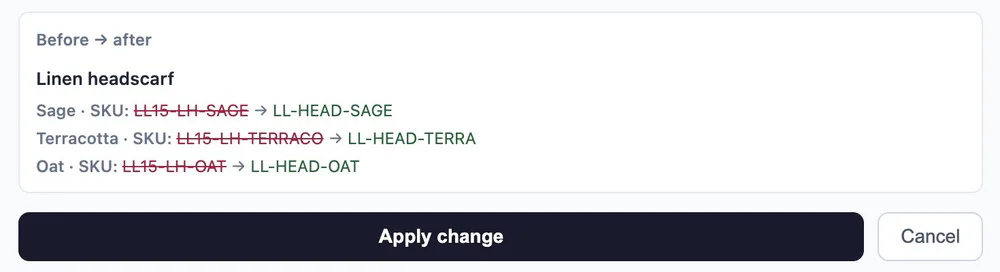
StoreDesk before and after list for the Linen headscarf: the Sage, Terracotta and Oat SKUs change from old codes to LL-HEAD-SAGE, LL-HEAD-TERRA and LL-HEAD-OAT, with an Apply change button

01Overview

SKUs for your variants in StoreDesk

A SKU generator builds stock-keeping unit codes from a product's details, such as LL-HEAD-SAGE for a sage linen headscarf. StoreDesk doesn't invent a SKU scheme for you. You choose the format and it does the typing: write the codes in Store Agent, check the old and new SKU for each variant, and approve.

You can set SKUs when you create a product with its variants, or change them later on products you already have. This page also covers what a SKU is and how to build codes that stay readable as your catalog grows.

What is a SKU?

A SKU (stock-keeping unit) is your own code for one sellable item: one product in one size and one colour. You make it up, it means something to your team, and it's what you look for on shelves, pick lists and supplier orders.

Each variant gets its own SKU, so a T-shirt in 3 sizes and 2 colours needs 6 of them.
How to create SKU numbers that stay readable

Build every SKU from the same parts in the same order, and keep it short. Then anyone on your team can read a code without looking it up, and codes for new products follow the same pattern as the old ones.

  • Start with a short product code, such as LL-HEAD for the linen headscarf
  • Add the variant parts in a fixed order: colour, then size
  • Use capital letters and numbers, with dashes between parts
  • Avoid letters that look like numbers, such as O and I
  • Don't reuse an old SKU for a different product

Set SKUs on existing variants by asking

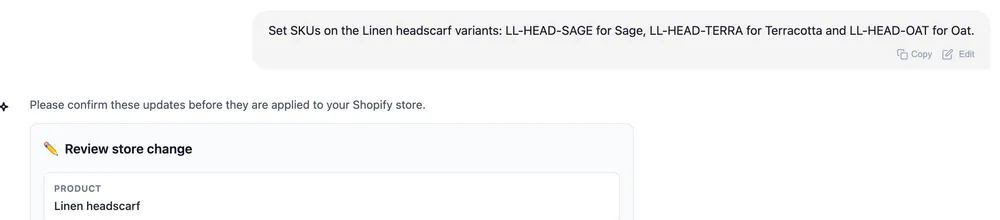
Name the product and give each variant its code, as in the request below. StoreDesk matches each code to the right variant and shows a before and after list: the old SKU struck through and the new one beside it. Nothing changes until you click Apply change.

Product names need to match your titles closely, or StoreDesk asks which product you mean.

StoreDesk
StoreDesk chat request to set SKUs on the Linen headscarf variants: LL-HEAD-SAGE for Sage, LL-HEAD-TERRA for Terracotta and LL-HEAD-OAT for Oat

Generate SKU codes while you create products

When you ask StoreDesk to create a product with variants, put the SKUs in the same request, for example "Create a Cotton Tee in S, M and L at $25 with SKUs TEE-S, TEE-M and TEE-L". The product review card lists every variant, and the SKUs are saved with them.

Leave SKUs out and the variants are created without one. StoreDesk won't make them up.

SKU vs UPC: what's the difference

A SKU is your internal code, and you can format it however you like. A UPC is a 12-digit barcode number that identifies a product for every retailer and marketplace, and it comes from GS1 rather than from you.

Many products have both: the SKU for your shelves and the UPC printed as a barcode. StoreDesk can save a barcode number you give it on a variant, but it doesn't issue UPCs.

02How it works

How to use SKUs for your variants in 4 steps

What you ask StoreDesk, what it shows you and what you approve, in order.

  1. Choose a format

    For example a product code, then colour, then size: LL-HEAD-SAGE.

  2. Write the SKUs in your request

    Name the product and give each variant its code.

  3. Check the before and after

    The review card shows the old and new SKU for every variant.

  4. Apply the change

    Click Apply change and the SKUs are saved on the variants.

04Get started

Try SKUs for your variants on your store

Add StoreDesk to your store and ask for SKUs for your variants in plain English. Nothing changes until you approve the plan.

05FAQ

SKUs for your variants questions

Answers to common questions about SKUs for your variants in StoreDesk.

Still have a question?

Write to us and a person answers.

What is a SKU?

A SKU, or stock-keeping unit, is a code you create for each sellable variant, such as TEE-BLK-M for a black T-shirt in Medium. It's for your own team: stock counts, picking and reordering.

How do I create SKU numbers?

Combine a short product code with the variant's options in a fixed order, separated by dashes, such as LL-HEAD-SAGE. Keep them short, use capitals and numbers, and never reuse a SKU for a different product.

How do I name SKUs for variants?

Give every variant the product's base code plus its options in the same order, such as TEE-BLK-S, TEE-BLK-M and TEE-BLK-L. Keep that order across your whole catalog so a SKU reads the same everywhere.

What is the difference between a SKU and a UPC?

A SKU is an internal code you make up for your own store, while a UPC is a 12-digit barcode number that identifies the product for every retailer. You can have both on the same variant.

Can StoreDesk generate SKUs automatically?

No, StoreDesk sets the SKUs you write and doesn't invent a scheme. You give the codes in your request and approve them on the review card. The SKU change in the screenshots used about 0.5 credits.