Store analytics

Natural language analytics: ask your store data in plain English

Type a question the way you'd ask a colleague and get the answer as a chart, a table or a number, worked out from your store's own data. It reads, it never writes.

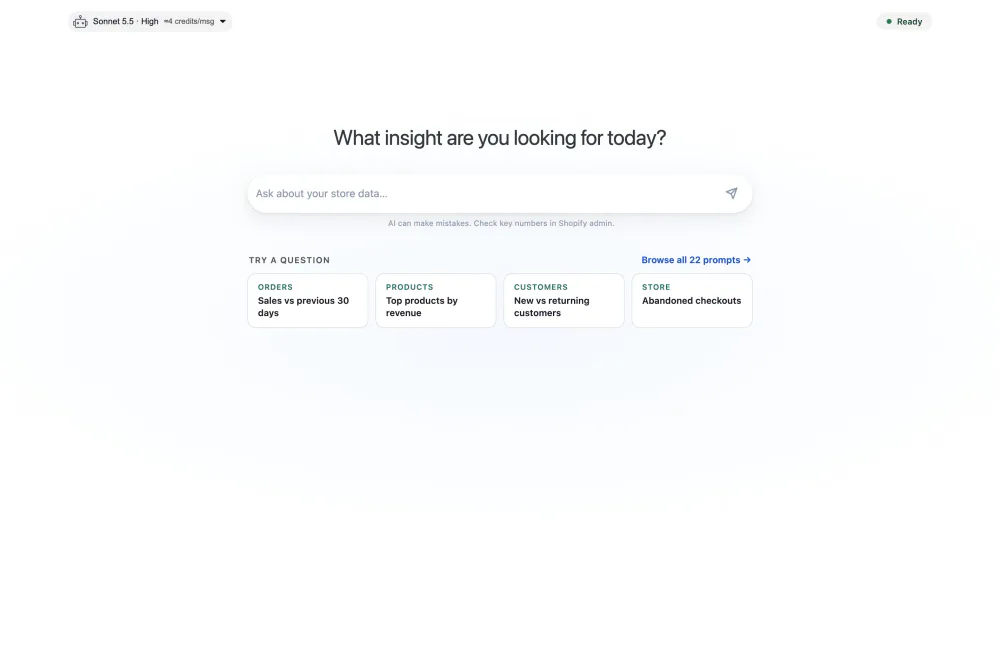
StoreDesk Store Analytics welcome screen asking what insight you are looking for, with a question box and starter questions on sales, top products, customers and abandoned checkouts

01Overview

Natural language analytics in StoreDesk

Natural language analytics means asking questions about your data in everyday words instead of building a report. You type "How are my sales in the last 30 days vs the previous 30 days?" and get the answer, without knowing which report or filter holds it.

StoreDesk's Store Analytics does this for your store. It works inside your Shopify admin, reads your orders, products, customers and other store data when you ask, and answers with a chart, a table or a single number. It's for owners who want quick ecommerce insights without learning a BI tool.

It only reads. It can't change a product, an order or a customer, and it says so if you ask it to.

Chat with store data the way you'd ask a colleague

You don't need the right report name. Ask in your own words and add a period or chart type if you have one in mind:

  • "Which discount codes were used in the last 30 days?"
  • "Customers who haven't ordered in 90 days"
  • "List abandoned checkouts from the last 30 days in a table"

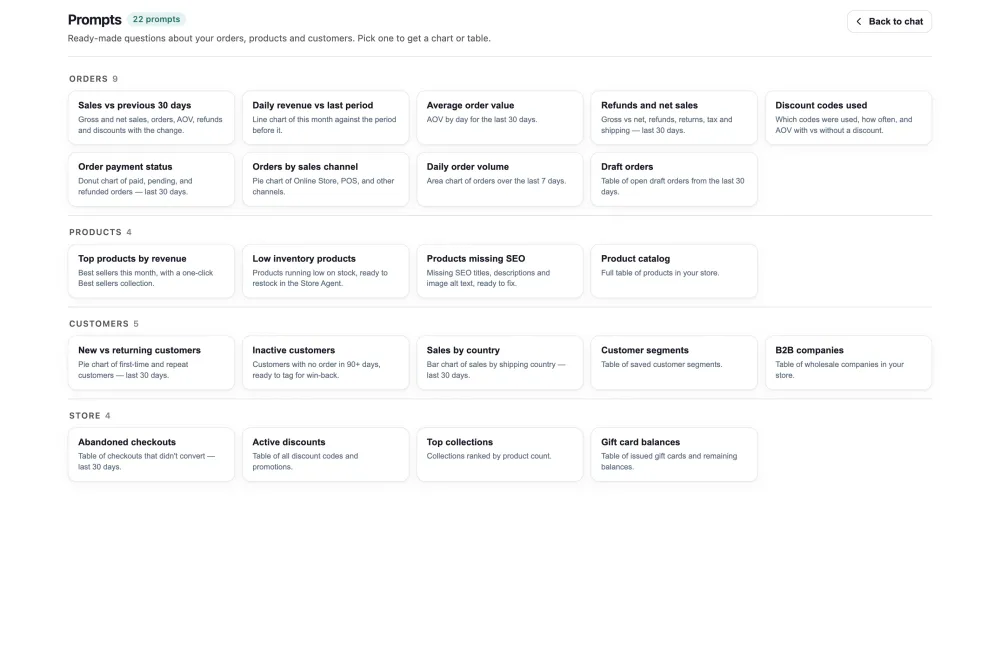
If a question is unclear, for example a product name that matches two products, StoreDesk asks which one you mean instead of guessing. Not sure where to start? The prompt library has 22 ready-made questions grouped into orders, products, customers and store.
StoreDesk
StoreDesk prompt library with 22 ready-made questions grouped into orders, products, customers and store

Where the numbers come from

AI sales analytics is only useful if the numbers are real. In StoreDesk the AI decides which data to fetch and which chart fits; the figures themselves come from your store data, and the chart is filled in from that data rather than written by the AI.

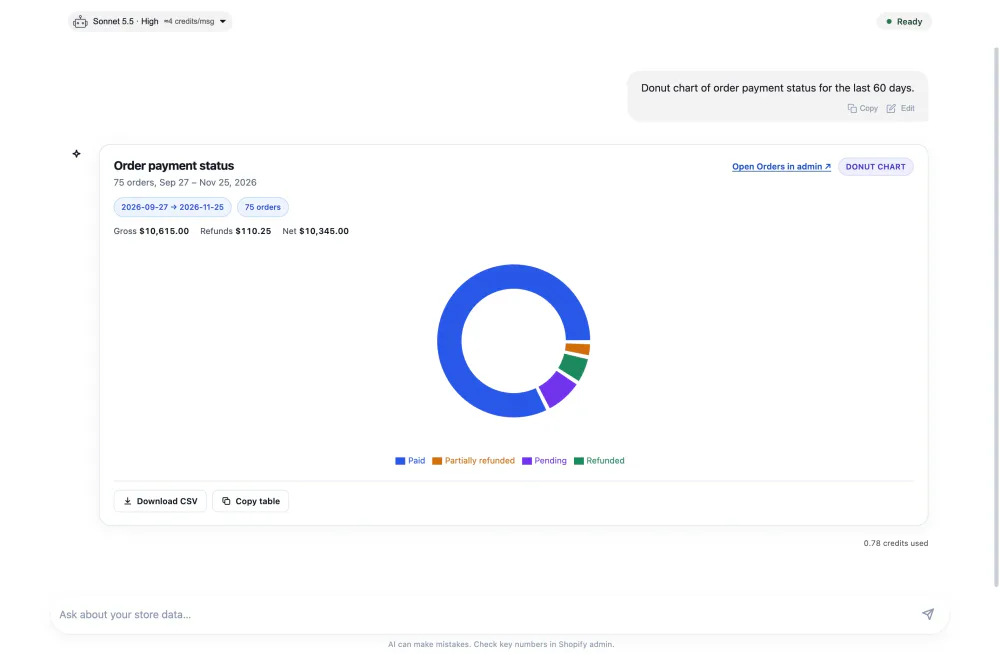
Every answer shows what it's based on: the date range, how many orders it read, and gross, refunds and net. When a period has more than 1,000 orders, the answer says the totals may be partial. The AI can still misread a question, so check key numbers in your admin before acting on them.

StoreDesk
StoreDesk donut chart of order payment status showing paid, partially refunded, pending and refunded orders

Read-only by design

Store Analytics has no way to write to your store. Ask it to change a price or tag a customer and it points you to the Store Agent instead.

Some answers come with a button that does exactly that, such as Make a Best sellers collection under a top products chart. The button opens the Store Agent with the request typed out, and nothing changes until you send it and approve the review card.

Customer privacy in your answers

StoreDesk doesn't read customer names, emails, phone numbers or addresses, so they never appear in an answer. Customer questions, such as top customers by spend or customers who haven't ordered in 90 days, show customer IDs next to their order count and spend. New vs returning customers is worked out from each customer's order count, so it still works without any contact details.

What it can't answer yet

An honest AI data analyst says when it can't help. StoreDesk reads the orders, products, customers and store records the app has access to, and nothing outside them. When you ask about something it can't see, it tells you plainly and suggests a question it can answer instead. Today that covers:

  • Orders older than 2 years, or 60 days until full order history access is granted
  • Customer names, contact details and sales by country
  • Payment payouts and marketing attribution
  • Markets reports and shipping labels
  • Funnel, heatmap, scatter or gauge charts

02How it works

How to use natural language analytics in 4 steps

What you ask StoreDesk, what it shows you and what you approve, in order.

  1. Open Store Analytics

    It's inside your Shopify admin, next to the Store Agent.

  2. Ask in plain English

    Type your question or pick one from the prompt library.

  3. Check the basis

    Look at the date range and order count above the answer before you rely on it.

  4. Follow up or act

    Ask the next question, download the CSV, or use a hand-off button to make a change in the Store Agent after approval.

04Get started

Try natural language analytics on your store

Add StoreDesk to your store and ask for natural language analytics in plain English. Nothing changes until you approve the plan.

05FAQ

Natural language analytics questions

Answers to common questions about natural language analytics in StoreDesk.

Still have a question?

Write to us and a person answers.

Can I ask questions about my sales in plain English?

Yes. In StoreDesk's Store Analytics you type questions like "Show gross vs net sales and refunds for the last 30 days" and get a chart, a table or a number from your store data, for up to 2 years of orders.

Is AI analytics accurate for ecommerce?

It's as accurate as the data it reads and the way it reads your question. StoreDesk fills charts from your store data rather than letting the AI write numbers, and shows the date range and order count behind each answer, but it can misread a question, so check key figures in your admin.

Does the analytics tool change my store?

No. Store Analytics is read-only and refuses requests to change anything. Changes go through the Store Agent, where nothing happens until you approve a review card.

Can it see my customers' names?

No. StoreDesk doesn't read customer names, emails, phone numbers or addresses. Customer answers show customer IDs with their order count and spend.

What can't it answer?

Orders older than 2 years (or 60 days until full order history access is granted), customer names and contact details, sales by country, payouts, marketing attribution, Markets reports and shipping labels. It says so when you ask and suggests a question it can answer.

Which AI model does it use, and what does it cost?

It uses the model you pick in the chat header, and each question uses credits for the AI it calls. In our demo store a daily orders chart used about 0.2 credits, and 1 credit is 1 cent of AI cost.