Store pages

Refund policy generator: a first-draft returns page to review

Shoppers read your returns page before they risk an order, so it has to be clear. Give StoreDesk your rules in a sentence and it drafts a refund and returns page for you to check before it goes live.

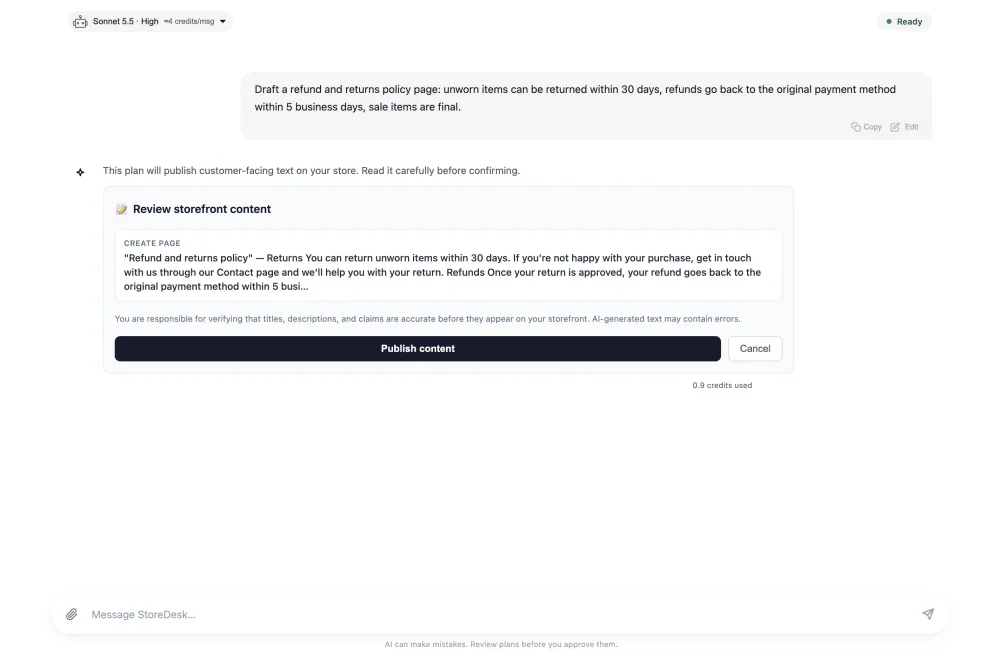
StoreDesk review card for a new Refund and returns policy page drafted from a 30 day return rule, with a Publish content button

01Overview

Refund policy generator in StoreDesk

StoreDesk works as a refund policy generator inside your Shopify admin. You type your rules, such as how long shoppers have to return items, what condition they must be in and how refunds are paid, and it drafts a returns page in plain language.

It writes your rules, not its own. If you don't say whether sale items can be returned, the draft can't know, so list every rule you want on the page. Treat the result as a first draft to review with a professional, since consumer law sets minimum rights in many places.

Nothing goes live until you approve it in the review card.

How to write a refund policy shoppers can follow

A good refund policy answers the questions a shopper has before they buy, in the order they'd ask them. Write it as short sections with plain headings, and avoid words like "may" and "at our discretion" where you mean a clear yes or no.

What a refund policy should include:

  • The return window, counted from delivery
  • Condition: unworn, unused, tags on, original packaging
  • What can't be returned: sale items, personalised items, hygiene items
  • How to start a return and who pays return shipping
  • How and when the refund is paid, or exchanges and store credit

How long should a return window be?

Long enough that a shopper can try the item, and short enough that you can still resell it. Pick a window you can honour every time, and count it from delivery rather than from the order date.

Check the law where your customers live first. In the EU, for example, shoppers can withdraw from most online purchases within 14 days, so a shorter window there isn't an option. Your page should never promise less than the law gives.

A return policy generator that uses your rules

A return policy template gives you someone else's rules. StoreDesk starts from yours: "Draft a refund and returns policy page: unworn items can be returned within 30 days, refunds go back to the original payment method within 5 business days, sale items are final."

It turns that into sections for returns and refunds, uses your numbers as you gave them and adds a pointer to your contact page. In our demo store this page used about 0.9 credits on the default model.

Shipping policy generator in the same chat

Your shipping page is the other half of the promise. Ask for it the same way: "Draft a shipping page: orders ship in 1 to 2 business days, delivery takes 3 to 5 days in the US, shipping is $6 under $75 and nothing over $75."

StoreDesk drafts both pages from your rules, shows each in a review card and creates them only when you approve. Link them from your footer menu in your admin, since StoreDesk doesn't edit menus.

02How it works

How to use refund policy generator in 4 steps

What you ask StoreDesk, what it shows you and what you approve, in order.

  1. Write down your rules

    Return window, item condition, exceptions, who pays return shipping and how refunds are paid.

  2. Ask StoreDesk for the page

    In Store Agent: "Draft a refund and returns policy page" followed by your rules.

  3. Check the draft

    Read the review card, or ask for a hidden page so you can read the full text in your admin first.

  4. Review, publish and link

    Have a professional check it, publish it, then add it to your footer menu.

04Get started

Try refund policy generator on your store

Add StoreDesk to your store and ask for refund policy generator in plain English. Nothing changes until you approve the plan.

05FAQ

Refund policy generator questions

Answers to common questions about refund policy generator in StoreDesk.

Still have a question?

Write to us and a person answers.

How do I write a refund policy?

Write down your return window, the condition items must be in, what can't be returned, how a shopper starts a return, who pays return shipping and how refunds are paid. Then put those rules into short sections with plain headings. StoreDesk can draft the page from your rules for you to review.

What should a refund policy include?

The return window, item condition, exceptions such as sale or personalised items, how to start a return, who pays return shipping, and how and when the refund is paid. If you offer exchanges or store credit, say how they work.

How long should a return window be?

Long enough to try the item and short enough to resell it, and never shorter than the law allows where your customers live. In the EU, for example, shoppers can withdraw from most online purchases within 14 days.

Is a generated refund policy legally binding?

A generated page is only as sound as the rules in it and the law it sits under, so treat it as a first draft. Have a professional check it, especially if you sell into several countries.

Does StoreDesk change my store's refund settings?

No. It creates a store page with your policy text. It doesn't change refund, return or policy settings in your admin.