AI product descriptions

Product title generator for clearer, honest listing names

A vague title like "Linen shorts" tells shoppers and search engines very little. Ask StoreDesk for clearer titles, see the old and new name side by side, and rename only what you approve.

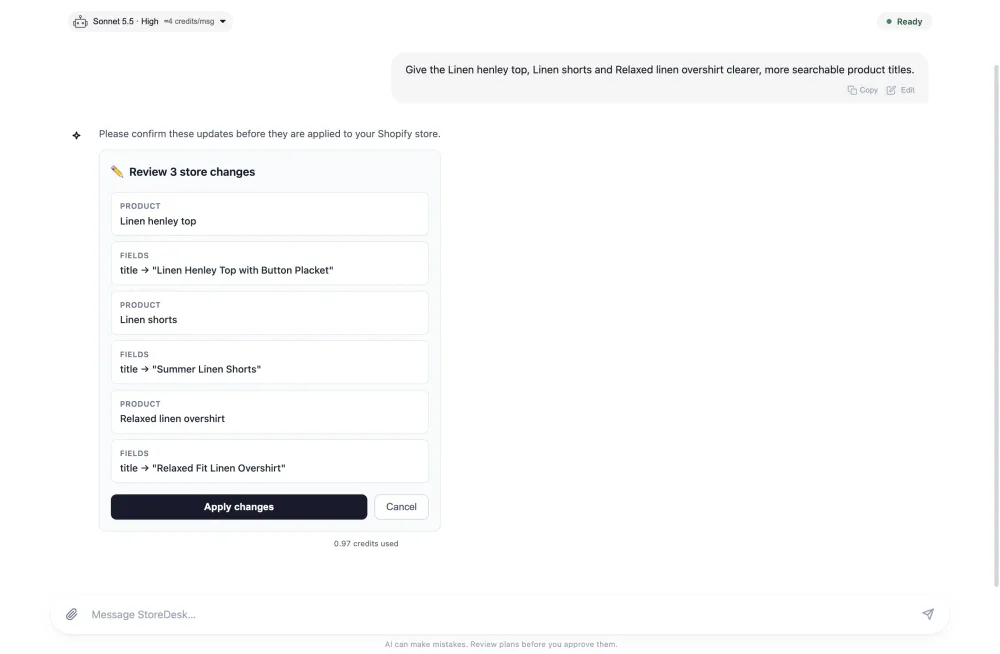
StoreDesk review of three product title changes, such as Linen henley top becoming Linen Henley Top with Button Placket, with an Apply changes button

01Overview

Product title generator in StoreDesk

StoreDesk works as a product title generator inside your Shopify admin. You name the products, ask for clearer or more searchable titles, and it proposes a new title for each one in a review card. Nothing is renamed until you press Apply changes.

There's no separate title screen: titles are written and changed through the Store Agent chat, the same place you set prices, stock and descriptions. That also means you can rename products and add tags in one request.

Titles stay true to the product. A button-down shirt is never renamed a T-shirt, and colours and sizes stay in the product's options instead of piling up in the name.

How to write a good product title

A good product title says what the item is in the words shoppers search, then adds the one or two details that set it apart. "Relaxed Fit Linen Overshirt" beats "The Weekend One" because a shopper can tell what it is before they click.

Put the words that matter at the front, since search results and small screens cut long titles short. Leave colours and sizes to the variant picker: a title that lists every option gets long fast and reads like a spec sheet.

  • Product type first: shirt, tote, tablecloth
  • Then the detail that sets it apart: material, fit, use
  • Colours and sizes in options, not the title
  • No claims you can't back up, like "best" or "#1"
Rename many products in one request

List the products you want to improve and ask for clearer titles, for example "Give the Linen henley top, Linen shorts and Relaxed linen overshirt clearer, more searchable product titles." The review card pairs each product with its proposed title, like Linen shorts becoming Summer Linen Shorts.

If a suggestion isn't right, cancel and ask again with what you want changed ("keep it under five words", "mention the button placket"). Products it can't find by exact title or handle are reported, not guessed.

Product name generator for new listings

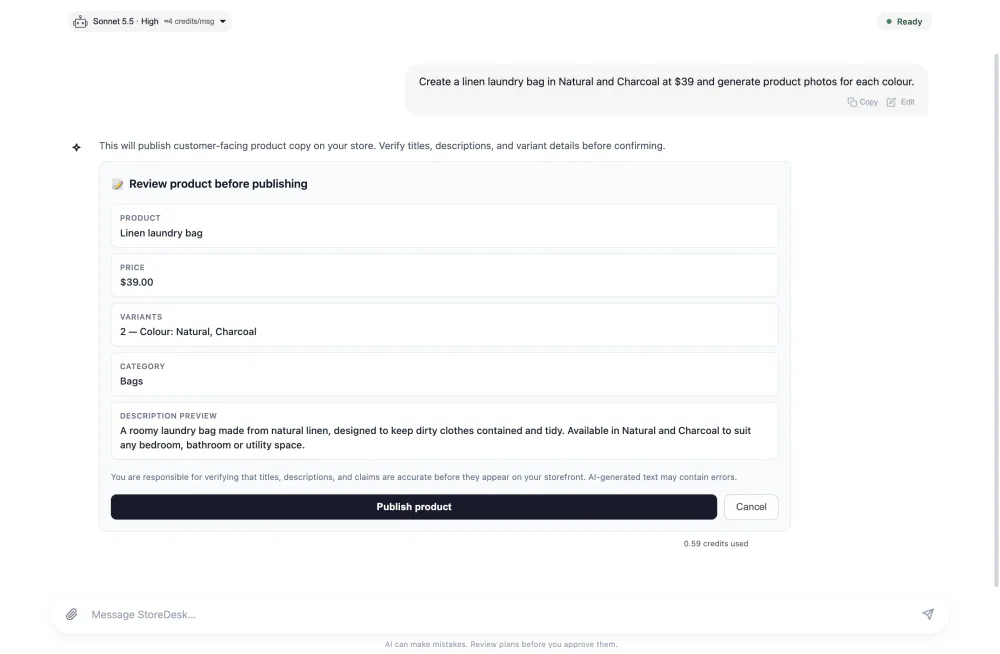
When you create a product through StoreDesk, it writes the title from your request and keeps it accurate. Ask "Create a linen laundry bag in Natural and Charcoal at $39" and the review card shows the title, price, variants and description before anything is created.

If you attach a product photo instead, the title has to match what the photo shows, and you still review it before the product exists.

StoreDesk
StoreDesk review card before publishing a new Linen laundry bag, showing its title, price, two colour variants, category and description

Titles and tags in the same chat

Tags help you group products into collections and filters. When you rename products, you can add or remove tags in the same request: "Rename the Linen shorts to Summer Linen Shorts and add the tag summer."

Adding a tag keeps the tags already on the product. StoreDesk only replaces the whole tag list when you ask it to set the exact tags.

02How it works

How to use product title generator in 4 steps

What you ask StoreDesk, what it shows you and what you approve, in order.

  1. Name the products

    Open Store Agent and list the products by their exact title or handle.

  2. Say what you want

    Clearer, shorter, more searchable, or a detail to mention. Add tag changes in the same request if you like.

  3. Compare old and new

    The review card shows each product with its proposed title.

  4. Apply or cancel

    Apply changes renames them. Cancel keeps every title as it is.

04Get started

Try product title generator on your store

Add StoreDesk to your store and ask for product title generator in plain English. Nothing changes until you approve the plan.

05FAQ

Product title generator questions

Answers to common questions about product title generator in StoreDesk.

Still have a question?

Write to us and a person answers.

How do I name a product?

Name it for what it is, in the words shoppers search, then add the one detail that sets it apart, like the material or fit. "Relaxed Fit Linen Overshirt" is clearer than a made-up name because a shopper knows what they're looking at.

How do I write a good product title?

Lead with the product type, add the key detail, and keep colours and sizes in the product's options. Keep it accurate: a title that oversells or names the wrong item misleads shoppers.

How long should a product title be?

Long enough to say what it is and what sets it apart, and short enough to read at a glance. Search results and phone screens cut long titles, so keep the words that matter at the front.

Can AI rename many products at once?

Yes. In StoreDesk you list the products in one request and get one review card with a proposed title for each. Nothing is renamed until you press Apply changes.

Does changing a product title change its URL?

No. StoreDesk keeps the URL handle as it is when it changes a title. If you want a new handle too, ask for it, and the old address redirects to the new one.