Product page SEO

Alt text generator for every product image in your store

Try the free alt text generator on one image below. Inside your store, StoreDesk fills the missing alt text on your products and collections, and nothing is saved until you approve it.

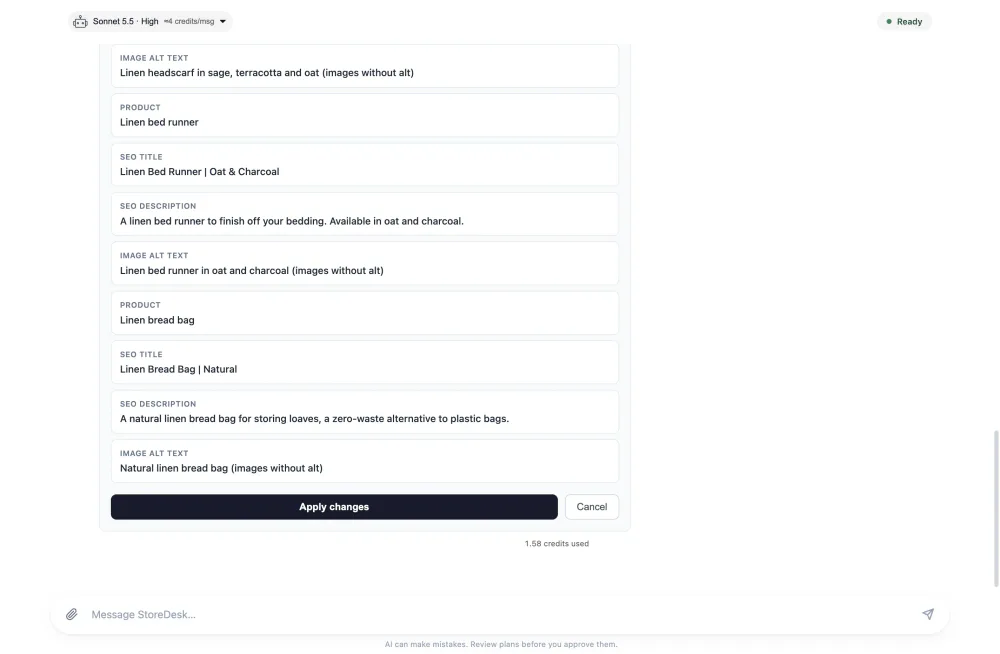
StoreDesk review card listing proposed SEO titles, meta descriptions and image alt text for several linen products, with an Apply changes button

Free tool

Free alt text generator

Upload a product image and get one line of alt text to paste into your store.

5 free a day

JPEG, PNG or WebP, up to 4 MB

Free, no sign-up.

The free tool is resting right now. StoreDesk does this for every product inside your store.

Example result

Alt text

71 characters (125 or fewer)Good length

Navy linen shirt with a button-down collar, laid flat on a white table.

Do this for every product inside your store with StoreDesk.

Add to your store

01Overview

Alt text generator in StoreDesk

An alt text generator writes the short description that sits in an image's alt attribute. Screen readers read it aloud to shoppers who can't see the photo, browsers show it when an image fails to load, and search engines use it to understand what the picture shows.

In a store, that means every product and collection image. The free generator on this page writes alt text for one image you upload. StoreDesk does the same job inside your Shopify admin for your whole catalogue: it finds products whose images have no alt text, drafts one line for each, and lists them for you to check.

You can ask in your own words or run the Fix missing alt text / SEO skill. Either way, nothing changes until you press Apply.

What is good alt text for a product image

Good alt text describes the image for someone who can't see it, in one plain sentence. Compare these two for the same photo:

  • Weak: "linen dress, linen dresses, summer dress, buy dress"
  • Better: "Linen slip dress in sand, shown from the front on a plain background"

The first is a keyword list, and a screen reader reads it out as noise. The second tells a shopper what they'd see, and it still names the product in the words people search for. That's the balance to aim for with product image alt text.

  • Start with the product, not "Image of" or "Photo of"
  • Name the colour, pattern or view a shopper would need
  • Keep it to one sentence, under about 125 characters
  • Leave out keyword lists, prices and selling words
How StoreDesk writes alt text inside your store

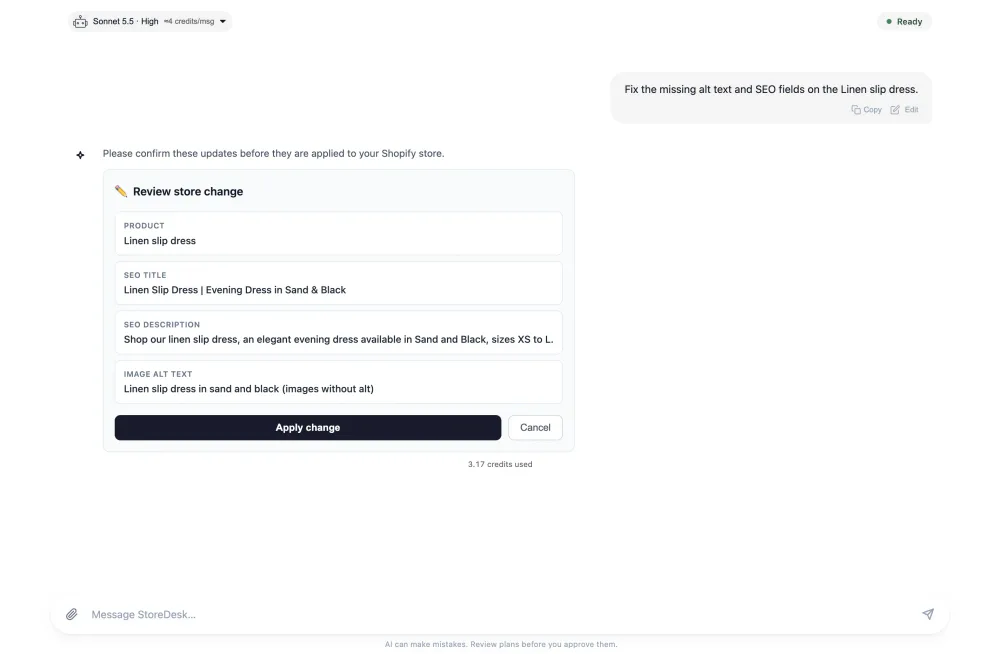
Ask for one product: "Fix the missing alt text and SEO fields on the Linen slip dress." StoreDesk reads the product, writes an alt line from its title and colours, and shows it on a review card next to the SEO title and description it plans. The card marks the line "images without alt", so you know it only goes on images that are still empty.

Because it writes from your product details rather than looking at each photo, the same line goes on all of that product's empty images. That suits a set of plain product shots. If a product has very different pictures, such as a fabric close-up or a styled room, edit those few by hand afterwards.

StoreDesk
StoreDesk review card for the Linen slip dress with a proposed SEO title, SEO description and the alt text line Linen slip dress in sand and black

How to add alt text in bulk

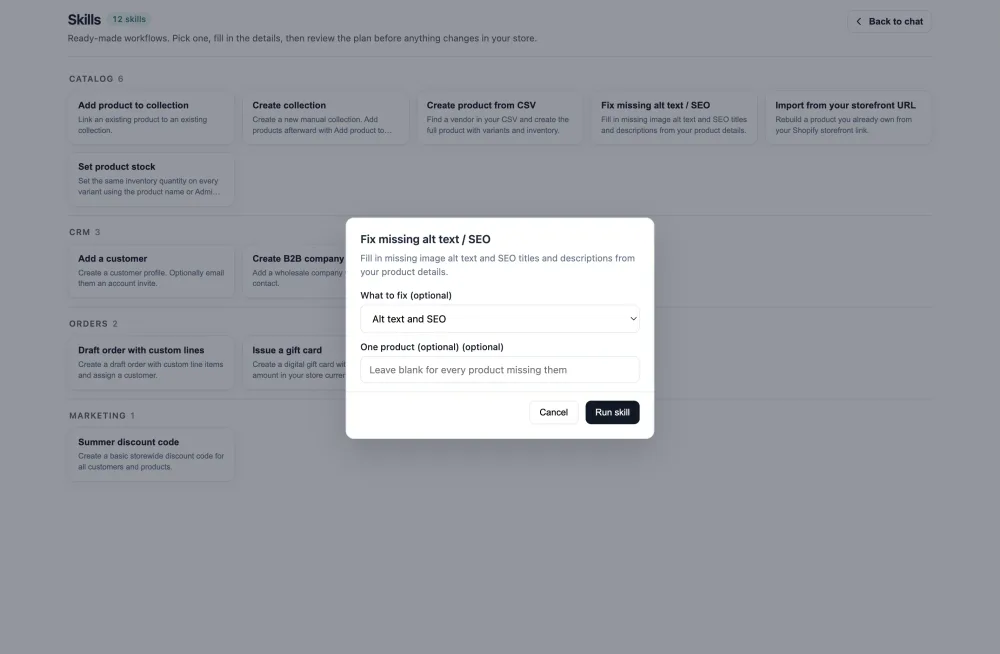
Open Skills, pick Fix missing alt text / SEO, set What to fix to Alt text only and leave the product field blank. StoreDesk checks the products in your store for images with no alt text, up to 200 in one request, and lists a line for each on one review card.

You can also type it: "Add alt text to every product image that doesn't have any." Read the list, then apply it all at once or cancel and ask again. In a catalogue bigger than 200 products, name the products you want fixed.

StoreDesk
StoreDesk skill form for Fix missing alt text / SEO, with a What to fix menu and a product field left blank to check every product

Collection images and rewrites

Each collection has one image, and it can have alt text too. Ask "Set the alt text on the Summer linen collection image to Linen shirts and dresses folded on a wooden bench", or ask StoreDesk to suggest a line from the collection's name.

If your products already have alt text that isn't good, ask for a rewrite, for example "Rewrite the alt text on the Linen bedding set images." StoreDesk then replaces the existing text instead of skipping it, and the review card shows what it will write. Change history can't undo alt text, so read the card before you approve.

02How it works

How to use alt text generator in 4 steps

What you ask StoreDesk, what it shows you and what you approve, in order.

  1. Ask or pick the skill

    Type what you want fixed, or open Skills and choose Fix missing alt text / SEO with Alt text only.

  2. StoreDesk checks your products

    It finds products whose images have no alt text and drafts one line for each from the title and colours.

  3. Read the review card

    Every proposed line is listed under its product. If one reads wrong, cancel and ask again with your own wording.

  4. Apply

    Press Apply and the alt text is saved to those images in your store. Nothing is written before that.

04Get started

Try alt text generator on your store

Add StoreDesk to your store and ask for alt text generator in plain English. Nothing changes until you approve the plan.

05FAQ

Alt text generator questions

Answers to common questions about alt text generator in StoreDesk.

Still have a question?

Write to us and a person answers.

How do I add alt text to product images?

Open the product in your store admin, select an image and type its alt text, or ask StoreDesk to do it for you. "Fix the missing alt text on the Linen slip dress" drafts a line and saves it to the product's empty images once you approve.

How do I add alt text in bulk?

Run StoreDesk's Fix missing alt text / SEO skill with the product field left blank. It drafts alt text for every product whose images have none, up to 200 products per request, and you approve the whole list at once.

What is good alt text for a product image?

Good alt text is one plain sentence that names the product and what a shopper would see, such as its colour, pattern or angle, in under about 125 characters. Don't start with "Image of" and don't stuff it with keywords.

Why does alt text matter for SEO?

Alt text is one of the ways search engines work out what an image shows, which helps your product images appear in image search. It also makes your store usable for shoppers on screen readers, which is why it exists in the first place.

Is the alt text generator free?

Yes, the generator on this page is free for 5 images a day. Inside your store, StoreDesk uses credits from your plan, and the Free plan comes with 50 credits, where 1 credit is 1 cent of AI cost.

Does StoreDesk look at my photos to write alt text?

No. Inside your store it writes alt text from the product's title and colours, so the line describes the product rather than each shot. The free generator on this page is different: it reads the image you upload.