Product page SEO

Meta description generator for product and collection pages

Try the free meta description and SEO title generator below. In your store, StoreDesk writes both fields for the products and collections you name and saves them only after you approve.

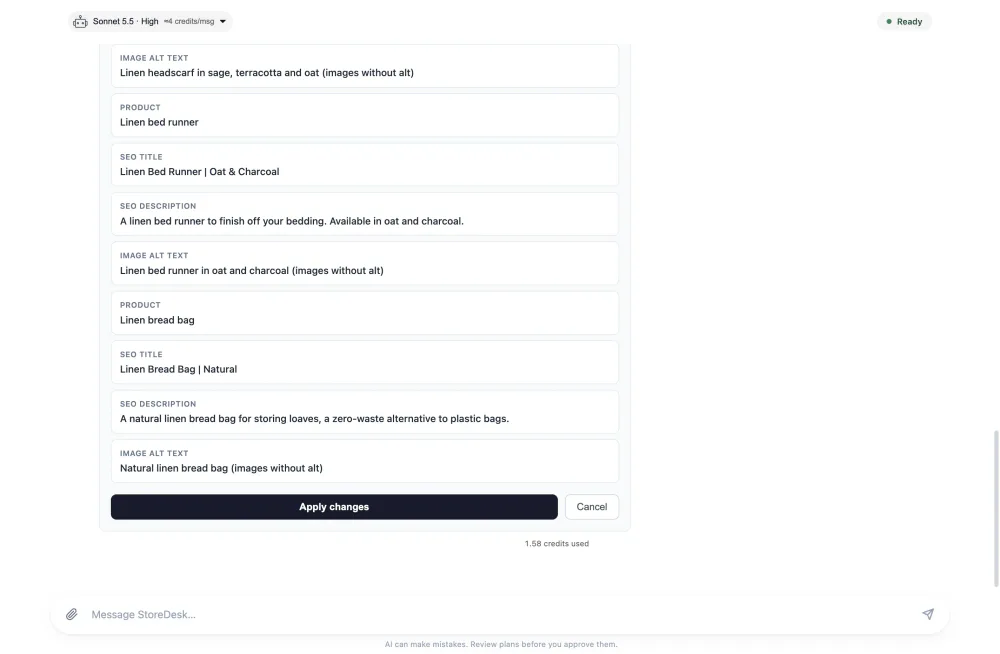
StoreDesk review card listing proposed SEO titles and meta descriptions for several linen products, with an Apply changes button

Free tool

Free meta description and SEO title generator

Describe a product or collection page and get an SEO title and a meta description of about 150 to 160 characters.

5 free a day

0/1000

Free, no sign-up.

The free tool is resting right now. StoreDesk does this for every product inside your store.

Example result

SEO title

50 characters (60 or fewer)Good length

Navy linen shirt for men, relaxed fit summer shirt

Meta description

154 characters (aim for 150 to 160)Good length

A breathable navy linen shirt with a relaxed fit and a button-down collar. Cool on hot days and easy to dress up or down. Shop the navy linen shirt today.

Do this for every product inside your store with StoreDesk.

Add to your store

01Overview

Meta description and SEO title generator in StoreDesk

A meta description generator writes the short summary a search engine may show under your page title in the results. An SEO title generator writes that title, the clickable line above it. Together they're the first thing a shopper reads about your product before deciding to click.

The free generator on this page writes both for one product or collection you describe. StoreDesk writes them inside your Shopify admin, straight into the real SEO fields of your products and collections, for one item or for every product that's missing them. You read each line on a review card before anything is saved.

Search engines don't always use your meta description. Sometimes they show text from the page instead. A clear one still gives them a good option, and it's the part you control.

How long a meta description should be, and what goes in it

Search results usually cut descriptions off somewhere around 150 to 160 characters, depending on the screen, so put the words that matter first. StoreDesk keeps its descriptions under 155 characters.

Compare two descriptions for the same product:

  • Weak: "Welcome to our store. We sell lots of great products at amazing prices."
  • Better: "A linen slip dress in sand and black, sizes XS to L. Light, breathable and easy to dress up for an evening out."

The first could sit on any page. The second says what the product is and gives a shopper a reason to click.

  • Say what the product is in the first few words
  • Use the phrase a shopper would search for once, naturally
  • Add a real detail: material, colours, sizes or use
  • Write a different description for every page
How to write an SEO title for a product page

Your SEO title, also called the meta title or title tag, is the clickable line in search results. Keep it under about 60 characters so it isn't cut off. Put the product name first, then the detail that sets it apart, such as type, colour or material.

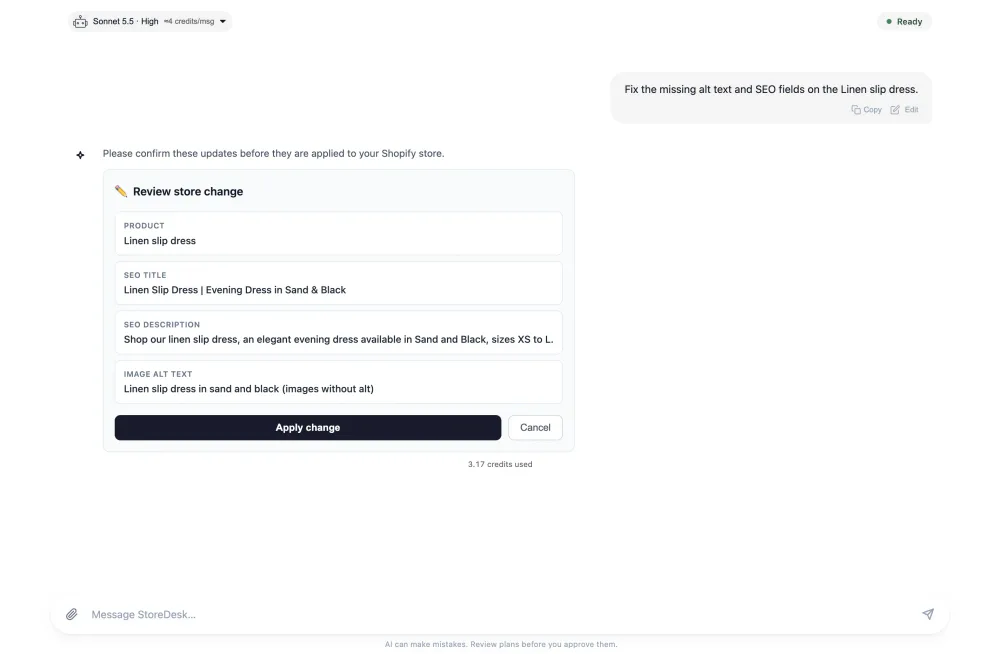
Ask StoreDesk "Fix the missing alt text and SEO fields on the Linen slip dress" and it proposes a title like "Linen Slip Dress | Evening Dress in Sand & Black" with a description to match. Both appear on the review card, so you can cancel and ask for a different angle before anything is saved.

StoreDesk
StoreDesk review card for the Linen slip dress with a proposed SEO title, SEO description and image alt text, and an Apply change button

SEO titles and meta descriptions for every product at once

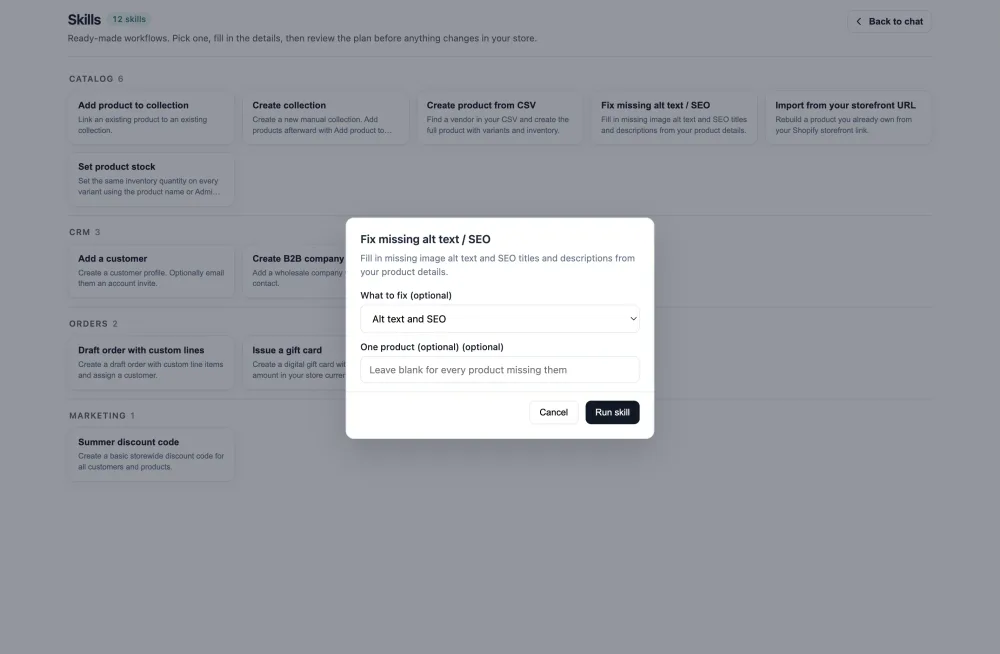
Open Skills, pick Fix missing alt text / SEO, set What to fix to SEO only and leave the product field blank. Or type it: "Write SEO titles and meta descriptions for every product that doesn't have them." StoreDesk checks up to 200 products in one request and lists a title and description for each one that's empty.

Every line is written from that product's own details, without invented claims. Read the list, then apply it all at once or cancel. Products that already have an SEO title or description keep them.

StoreDesk
StoreDesk skill form for Fix missing alt text / SEO, with a What to fix menu and a product field left blank to check every product

Collection page titles and descriptions

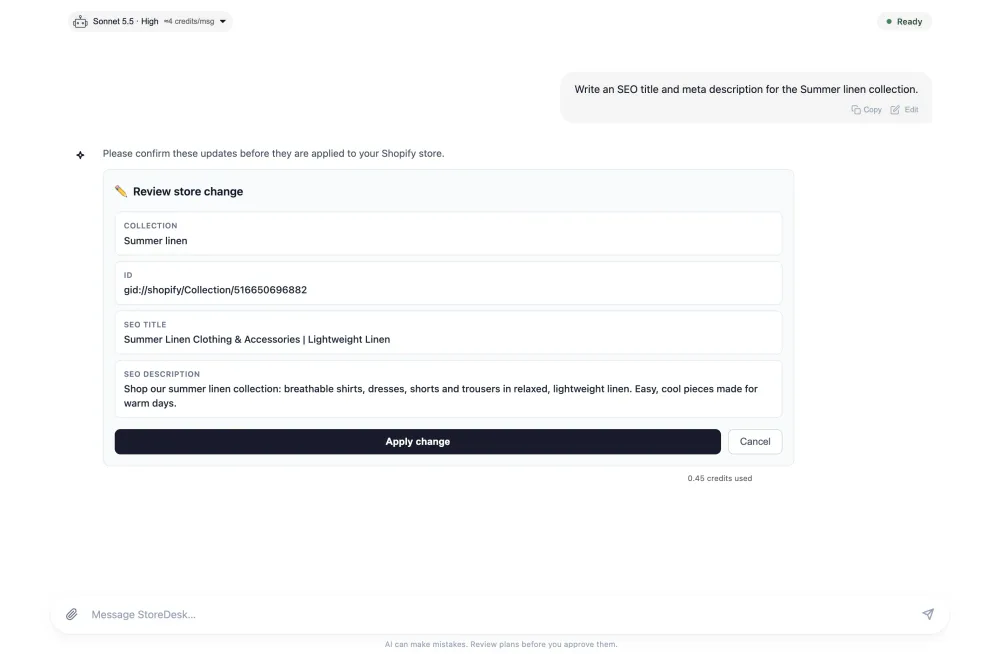
Collections often rank for broader searches than single products, such as "linen summer clothes", so their search fields are worth filling too. Ask for one by name: "Write an SEO title and meta description for the Summer linen collection."

In our demo store that request proposed the title "Summer Linen Clothing & Accessories | Lightweight Linen" and a description naming the shirts, dresses, shorts and trousers inside. If you also rename a collection's URL handle, StoreDesk keeps a redirect from the old address so existing links still work.

StoreDesk
StoreDesk review card with a proposed SEO title and meta description for the Summer linen collection

02How it works

How to use meta description and SEO title generator in 4 steps

What you ask StoreDesk, what it shows you and what you approve, in order.

  1. Name what to fix

    Ask for one product, a collection or every product missing SEO fields, or run the Fix missing alt text / SEO skill with SEO only.

  2. Read the review card

    StoreDesk lists the SEO title and meta description it plans for each item, within the 60 and 155 character limits.

  3. Adjust if you want

    Cancel and ask again, for example for a shorter title or a different detail in the description.

  4. Apply

    Press Apply and the text is saved to the SEO fields of your products and collections. Nothing is written before that.

04Get started

Try meta description and SEO title generator on your store

Add StoreDesk to your store and ask for meta description and SEO title generator in plain English. Nothing changes until you approve the plan.

05FAQ

Meta description and SEO title generator questions

Answers to common questions about meta description and SEO title generator in StoreDesk.

Still have a question?

Write to us and a person answers.

How long should a meta description be?

Aim for about 150 to 160 characters, because search results usually cut longer ones off. Put the most useful words first in case it's trimmed. StoreDesk keeps its descriptions under 155 characters.

How do I write a meta description for a product page?

Say what the product is, add one real detail such as material, colours or sizes, and give a shopper a reason to click, in one or two sentences. Write a different one for every product, and use the phrase people search for once, naturally.

How long should an SEO title be?

Keep an SEO title under about 60 characters so it shows in full in search results. StoreDesk keeps the titles it writes under 60 characters.

How do I write an SEO title for a product page?

Start with the product name, then add what sets it apart, such as type, colour or material, and keep it under about 60 characters. Avoid repeating the same title on several products.

Does AI write good meta descriptions?

AI writes good first drafts when it works from real product details, but it can still get a fact wrong. That's why StoreDesk shows every title and description on a review card and saves nothing until you approve it.

Is the meta description generator free?

Yes, the generator on this page is free for 5 uses a day. Inside your store, StoreDesk uses credits from your plan, and the Free plan comes with 50 credits, where 1 credit is 1 cent of AI cost.